Article · May 28, 2026
Semantic Caching: Stop Paying for the Same Answer Twice
Repetition is one of the fastest ways to inflate an AI bill. This post breaks down semantic caching and shows how storing and reusing AI responses can dramatically cut token costs at scale.
Indulge me for a second. Imagine hiring someone who answers the same customer question 50 times a day and insists on pretending it's the first time they've heard it. As a human, this may get annoying after a while but nonetheless, it's not costing the company any extra for the customer service rep to repeat themselves 50 times during their shift.
But when we apply this to most modern day implementations of AI customer service agents, we start to incur some serious cost. Repetition is one of the fastest ways to inflate an AI bill. And without a decent semantic caching strategy in place, your customers and AI agent may unintentionally be costing you a lot of money.
So, What Exactly Is Semantic Caching?
Semantic caching is like giving your AI app the ability to say: "Wait...haven't I heard something like this before?" Instead of looking for identical prompt text, semantic caching looks for identical meaning. Semantic caching is storing AI-generated responses and serving them again when a sufficiently similar question is asked, instead of calling the model every time. Prompts are typically cached in a place where prior responses can be retrieved, such as a database.
Here's a customer support example:
User:
Can I return a couch?Later:
User:
What's the return policy on furniture?To us humans (unless you sent AI to summarize this blog post), those questions feel pretty similar. They're asking about the same thing. But to a computer? Can I return a couch? ≠ What's the return policy on furniture? Both sentences are comprised of different words, diifferent characters, and different strings. However, semantic caching matches meaning instead of text.
So, why is this great? Well, there's no model call! And if there's no model call, there's no new output that gets generated which means you're not going to pay twice for similar output for the same question. But like most things in life, this approach does come with it's own caveat. Semantic caching introduces a similarity threshold. If the threshold is too low, you risk returning the wrong answer. And if the threshold is too high, you miss opportunities to save money.
While I won't cover setting thresholds in this post, I do recommend planning for a solid evaluation strategy to validate whether your chosen threshold returns the expected response for most customer questions. From there, you'll start to get an idea as to whether you're using the most appropriate threshold for your solution.
Thresholds aside, for this post, we'll further explore semantic caching with Claude models.
Let's Follow the Journey of a Question
Questions don't just magically arrive at a language model and come back with answers. There's actually a whole chain of events happening behind the scenes. Let's go back to the Can I return a couch? example and unwrap it's journey from user prompt to agent output.
- User submits a question: the question is converted into a vector embedding.
- Similarity search: the embedding is compared against stored embeddings in a vector database.
- Cache hit: if a sufficiently similar question exists above a set threshold, the stored answer is returned immediately. No model call is made.
- Cache miss: if no similar question is found, the model is called, the response is generated, and both the question embedding and answer are saved for future use.
The similarity search is key here. You may be wondering: Why convert the question into an embedding at all? Why not just compare the text directly?
Well, computers aren't particularly great at understanding meaning. They're great at understanding exact matches.
To us, these questions feel nearly identical: Can I return a couch? and What's the return policy on furniture?. We instantly recognize that they're asking about the same thing. But to a computer, these are just two completely different strings of text. Semantic similarity requires moving beyond the exact words and representing the meaning behind them. That's where embeddings come in.
Embeddings convert text into a numerical representation, called a vector, that captures semantic relationships. Questions with similar meaning end up positioned closer together in vector space, while unrelated questions sit farther apart. So instead of asking Do these words match?, we can ask Do these ideas live near each other?. Once the user's question becomes an embedding, we can run a vector similarity search against previously stored questions. If two vectors land close enough together, we treat them as semantically similar and can reuse the cached answer.
Why Repetition Gets Expensive Fast
Since language model providers charge per input token and output token, every cache hit eliminates both input and output tokens for that request. For example sake, let's look at a conversation with Claude Haiku 4.5. As of May 2026, Claude Haiku 4.5 is $1/Million Token and $5/Million Token. If a cached answer saves 500 input tokens and 200 output tokens per hit, and it's served 50 times, you will have saved $0.075.
At first glance, that may seem like small potatoes. But if we apply that to a bigger scale, things start to look a bit different. Imagine your application serves that same cached response 50,000 times instead of 50. Suddenly, that tiny savings becomes $75 for a single repeated question and answer pair. Now multiply that across dozens of common questions, multiple users, and months of usage. Those little token savings begin stacking on top of one another pretty quickly! Before long, you're no longer talking about pocket change. You're talking about a meaningful reduction in cost simply by avoiding work your app already did before.
Semantic Caching Lab
I love visualizing concepts so, I present to you my Semantic Caching Lab! My Semantic Caching Lab is purely for demo and learning purposes. It provides a dashboard for visualizing AI costs and estimated cost savings for a conversation with a customer service agent for fictional brand Gittens Mercantile.
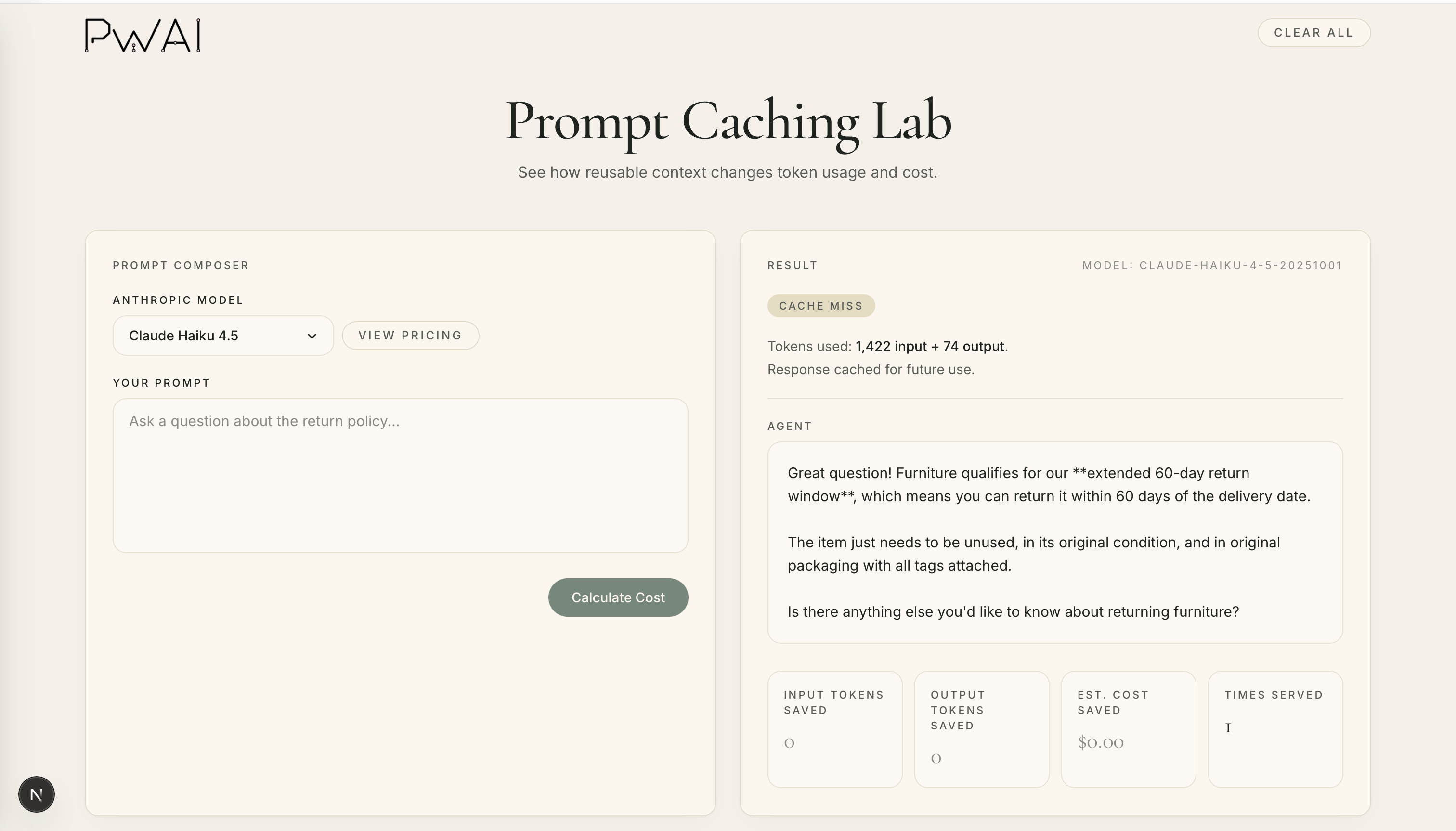
Get the Sample: github.com/prettywiredlabs/prompt-caching-lab
For demo sake, the agent is designed to only answer questions about the Gittens Mercantile's return policy which is passed to the agent via a return_policy.md file referenced in the agent's system prompt.
Key components
main.py— the main loop that orchestrates the full flow: accepts user input, checks the cache, calls a Claude model on a miss, logs results.utils.py— helper functions for connecting to the database, loading the system prompt, running the vector similarity search, and counting tokens.- MongoDB / Azure Cosmos DB — stores question embeddings and cached answers; the vector index enables similarity search.
- OpenAI embeddings — converts each question into a vector (
text-embedding-3-small) for semantic comparison. - Anthropic Claude model — called only on cache misses; responses are stored immediately after generation.
- Session logging — every interaction (hit or miss) is logged with token counts, similarity scores, and timestamps.
The similarity threshold
- A configurable threshold (e.g.,
0.70) determines how similar two questions must be to count as a cache hit. - Lower threshold = more aggressive caching (risk of serving a wrong answer); higher = more conservative.
Let's take the Semantic Caching Lab for a ride to see how we're able to save some money by caching prompts!
Example 1: The First Question (Cache Miss)
We'll start fresh by asking the agent it's first question: What is the return window for furniture?
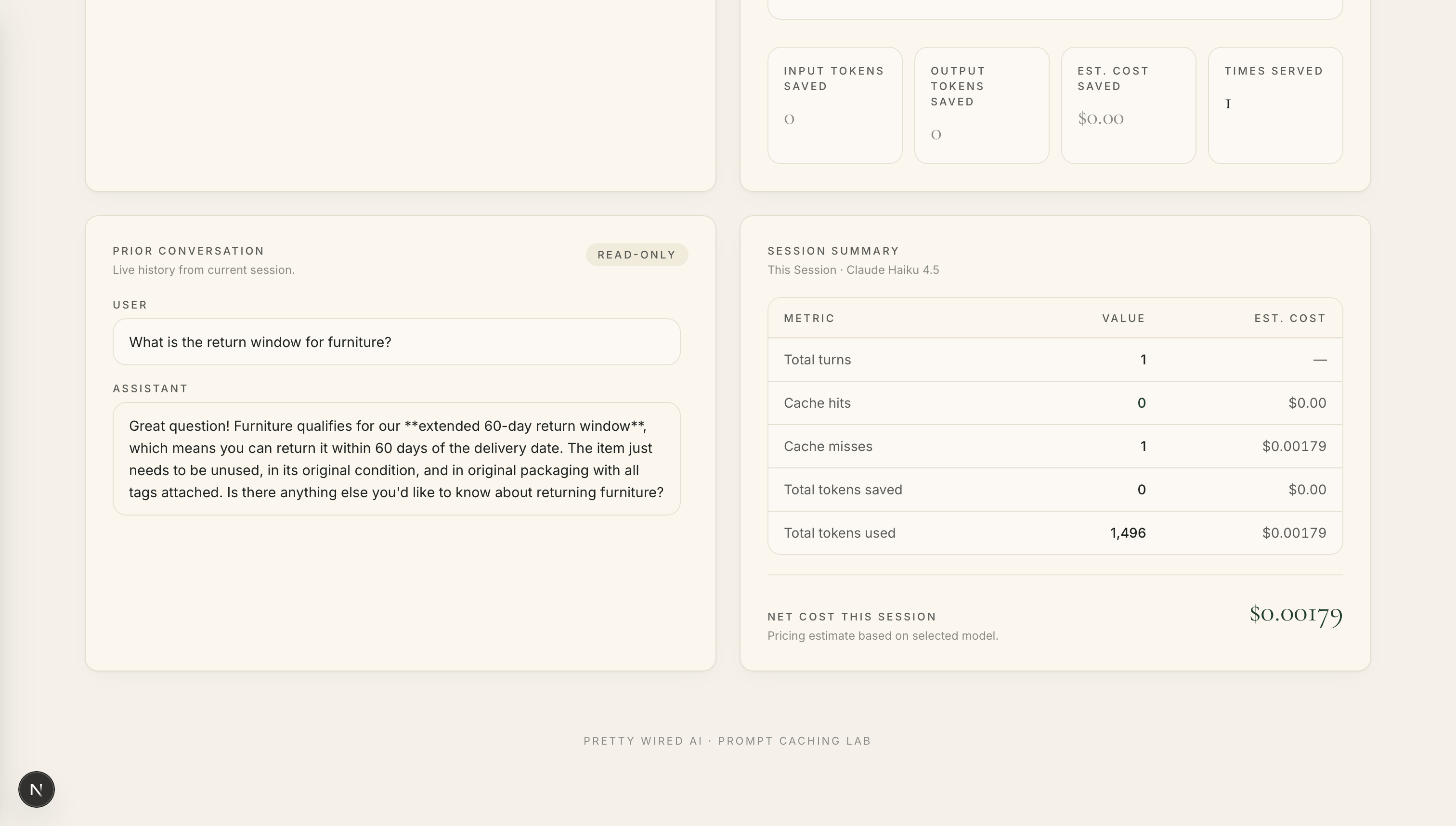
As expected, we experienced a cache miss. The Claude model is called and a response is both generated and cached. And so far, we've spent $0.00179.
Example 2: A Semantically Similar Question (Cache Hit — Semantic Match)
Let's now ask a different question that means the same thing: How long do I have to return a sofa?
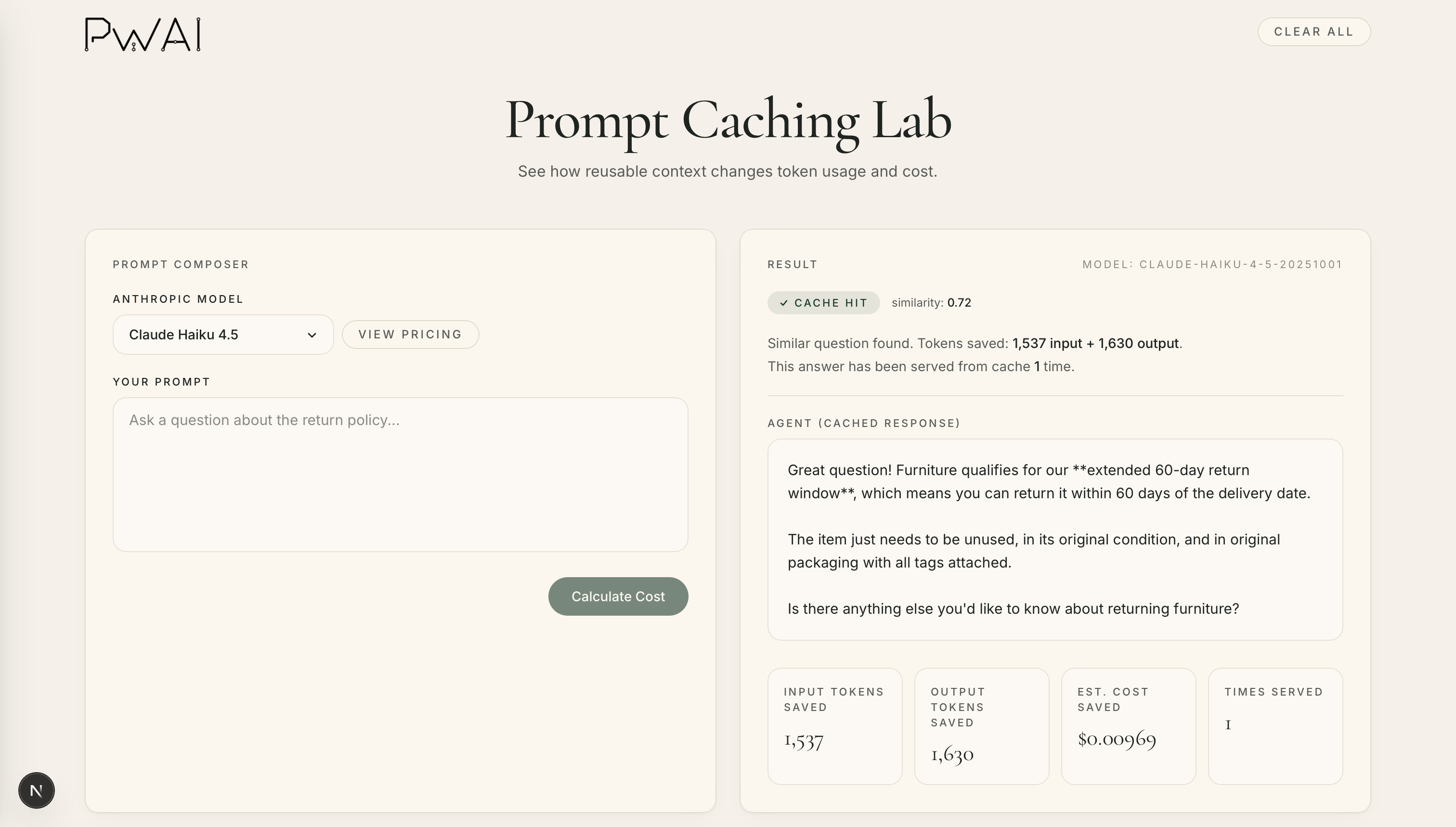
We now have a cache hit! The similarity score of 0.72 indicates that the current question is semantically very similar to a previously cached prompt. If it helps, you can think of the similarity score as a confidence meter. The closer the score is to 1.0, the more likely the questions are asking about the same thing.
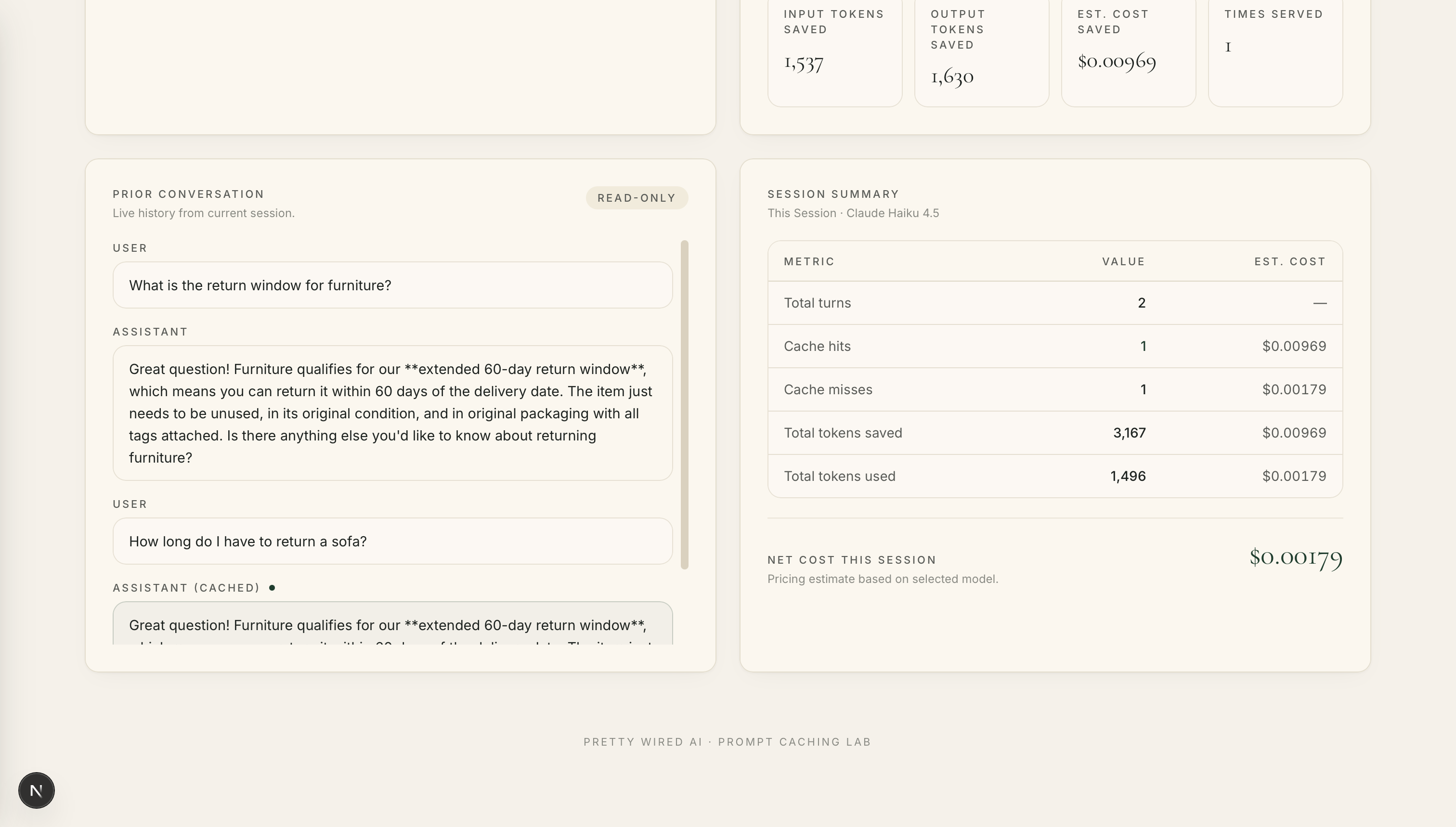
Since we have a cache hit, we retrieve the saved answer from the database and serve it directly to the user. We avoid calling the model altogether which means we avoided paying for the same answer twice.
The estimated cost savings is $0.00969.
Example 3: A Different Question (Cache Miss)
Moving along, let's say we now ask the agent: What happens if my item arrives damaged?
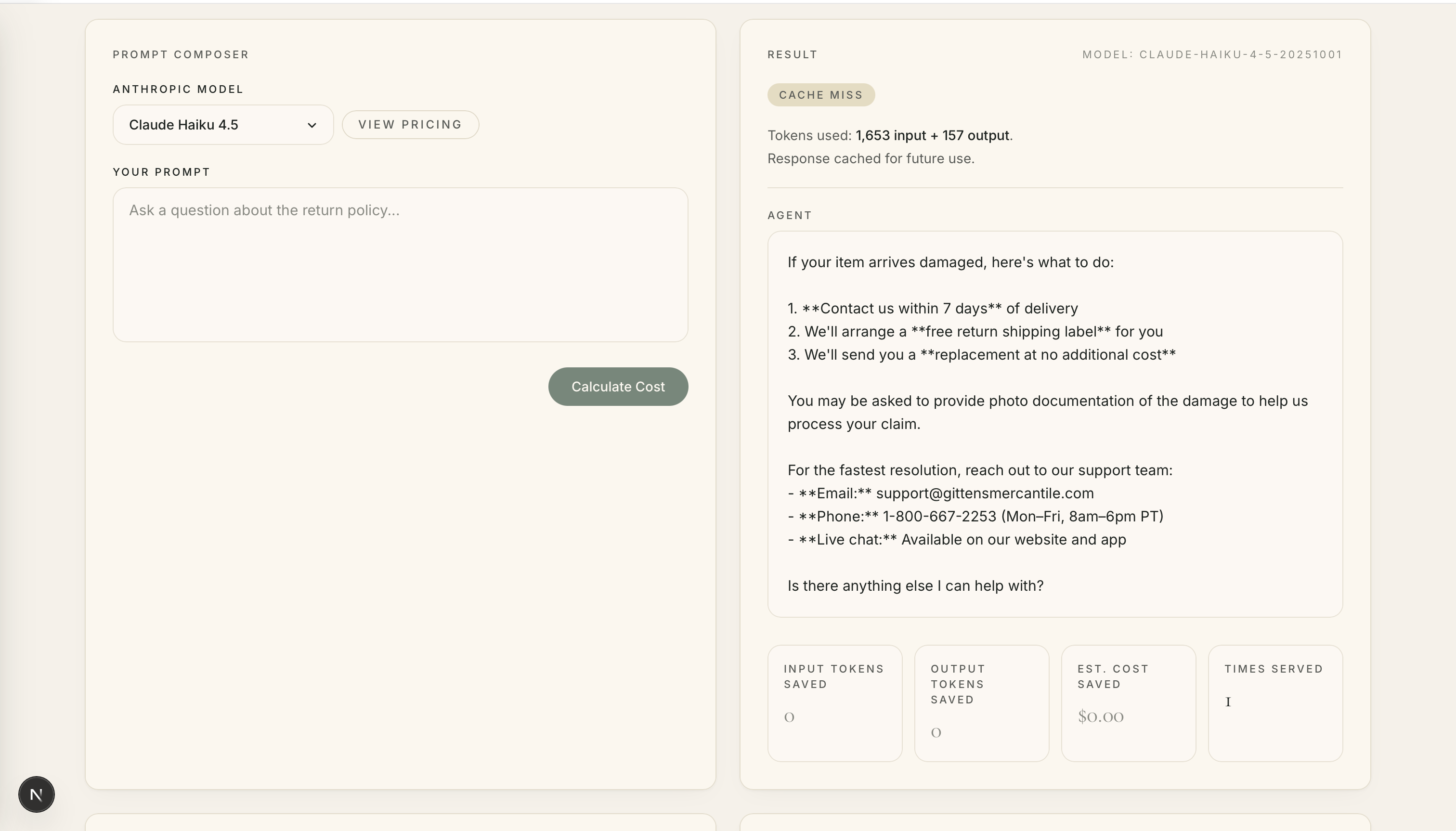
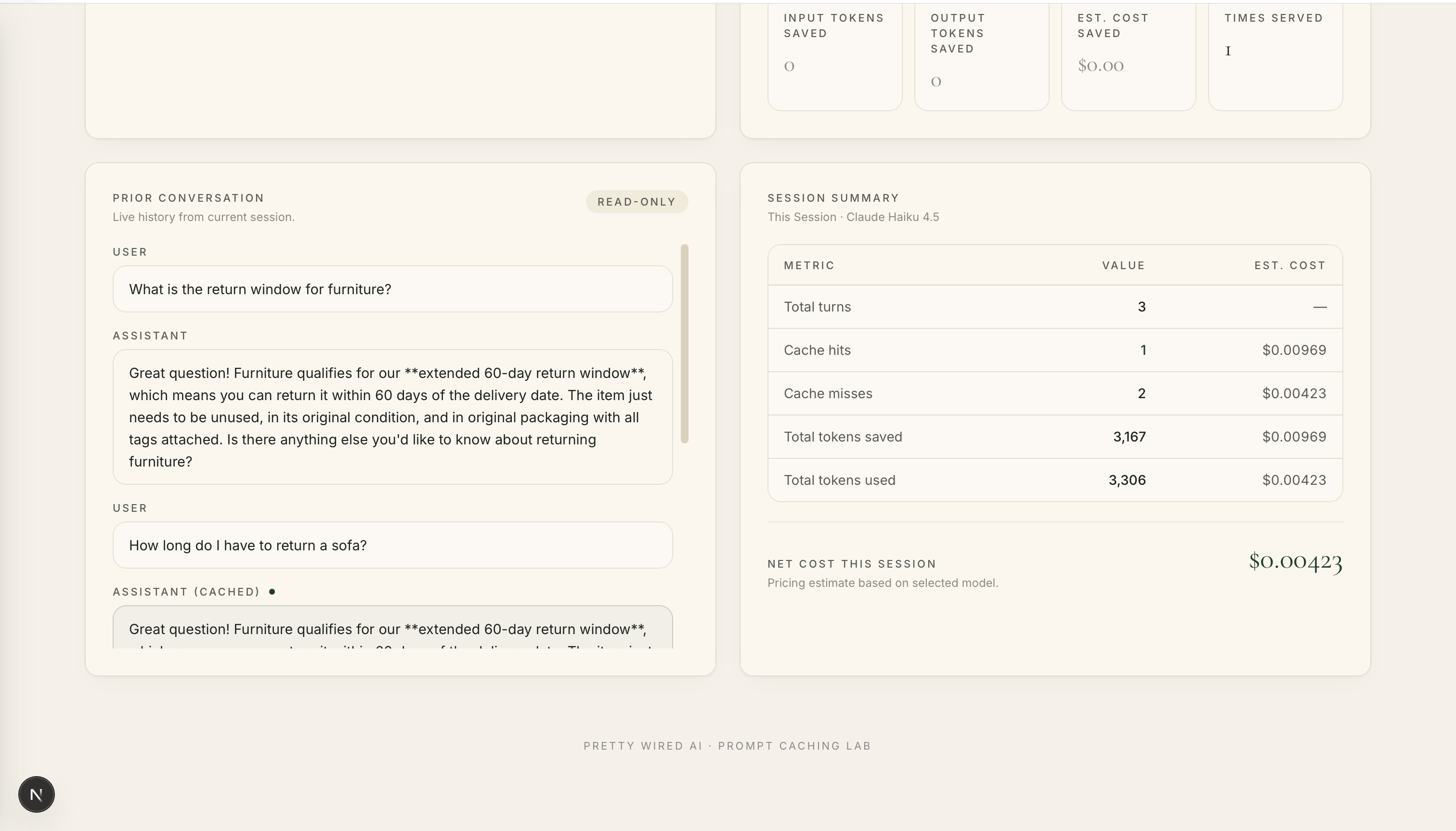
As expected, we have another cache miss. The Claude model is called and a new response is generated and stored for future use. While it sucks that we didn't get to save any money on this question, what it does do is prepare us for future conversations with other customers who may ask a similar question.
Good Things Take Time
If you're just getting started with semantic caching, don't expect dramatic cost savings on day one. An empty cache means your application first needs time to learn from real customer interactions and build up a collection of reusable questions and answers. Think of the early days as laying the foundation. As more conversations happen, your cache gradually becomes more valuable and opportunities for cache hits begin to increase.
If you'd rather not start from a completely blank slate, consider pre-seeding your cache with recurring questions, common support scenarios, or frequently asked questions. That way, your application has a head start and can begin benefiting from cached responses before enough real-world conversations naturally accumulate.
If you want to explore the Semantic Caching Lab's full implementation and see how all of these pieces fit together in practice, check out the repo: github.com/prettywiredlabs/semantic-caching-lab.